

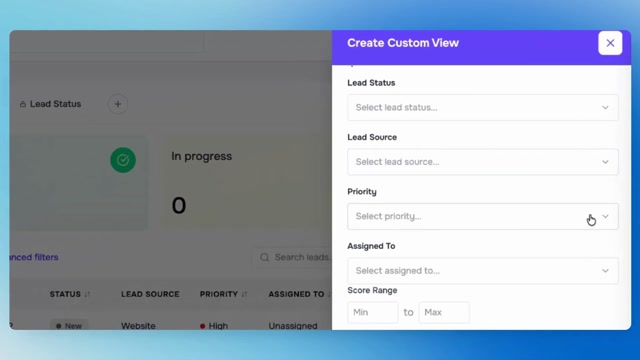
Master Lead Management with Custom Views | LIO Part 2

#WorkflowAutomation #ProductivityHacks #TechTools 𝗙𝗶𝗹𝘁𝗲𝗿𝘀 𝗵𝗲𝗹𝗽 𝘆𝗼𝘂 𝗳𝗶𝗻𝗱 𝘁𝗵𝗲 𝗿𝗶𝗴𝗵𝘁 𝗹𝗲𝗮𝗱𝘀. 𝗖𝘂𝘀𝘁𝗼𝗺 𝘃𝗶𝗲𝘄𝘀 𝗵𝗲𝗹𝗽 𝘆𝗼𝘂 𝘀𝘁𝗮𝘆 𝗳𝗼𝗰𝘂𝘀𝗲𝗱 𝗼𝗻 𝘁𝗵𝗲𝗺. In Part 2 of our Lead Management series, we show you how to move beyond filtering and create custom views that keep your most important lead segments just one click away. No more rebuilding filters every day. No more digging through crowded pipelines. Just organized, personalized views built around the way your team works. 𝗜𝗻 𝘁𝗵𝗶𝘀 𝘃𝗶𝗱𝗲𝗼: • Switch between All Leads, My Leads, and Unassigned Leads • Create and save custom lead views • Build advanced filters using status, source, score, and follow-ups • Customize columns for different workflows • Manage and delete saved views • Add new leads manually in seconds 𝗧𝗵𝗶𝘀 𝗶𝘀𝗻’𝘁 𝗷𝘂𝘀𝘁 𝗮 𝗹𝗲𝗮𝗱 𝗹𝗶𝘀𝘁 — 𝗶𝘁’𝘀 𝗮 𝘀𝗺𝗮𝗿𝘁𝗲𝗿 𝘄𝗮𝘆 𝘁𝗼 𝘄𝗼𝗿𝗸.
0 Comments
Comments live in community threads. Post this video to a community to start the conversation.